

Claude Design Explained: Features, Pricing, and the New AI Handoff Workflow
How Anthropic’s Claude Design transforms prompts into interactive React prototypes with MCP-powered brand consistency and seamless Claude Code integration.
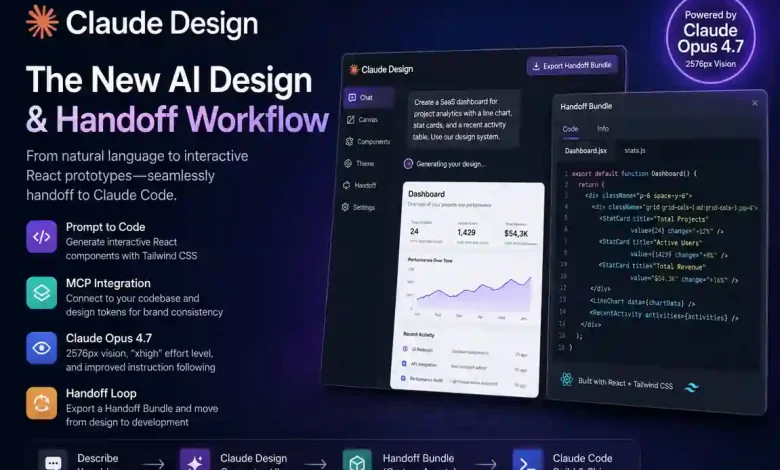
What Is Claude Design? Features, Pricing, and the New Handoff Workflow
Claude Design is an AI-powered design platform that generates functional, interactive prototypes directly from natural language. Unlike traditional tools that focus on static vectors, Claude Design outputs live code—primarily React and Tailwind CSS—that can be tested and iterated on immediately.
Launched in April 2026, the tool addresses the “Intent-to-Asset Gap”: the friction between a product concept and its first tangible draft. By integrating directly with existing codebases, Anthropic is positioning Claude Design as the “front-end” of a unified development loop that culminates in production-ready code.
In This Article
- Brand Consistency: Leveraging MCP to ingest design systems.
- Claude Opus 4.7: 2576px vision and “xhigh” effort levels.
- The Handoff Loop: Moving from Claude Design to Claude Code.
- Claude Design vs. Figma: Choosing the right workflow layer.
- Pricing & Limits: Navigating Pro, Max 5x, and Max 20x plans.
1. Establishing Brand Consistency via MCP
The core differentiator of Claude Design is its codebase awareness. Using the Model Context Protocol (MCP), the tool connects directly to your local GitHub repositories or style-dictionary tokens.
Practical Case: In testing with a 14-component SaaS dashboard, connecting a theme.json file allowed Claude to instantly adopt specific border-radii, drop shadows, and typography scales. Instead of generating generic layouts, the AI infers your existing design language, ensuring the first draft feels like an extension of your current product rather than a generic template.
2. High-Resolution Vision with Claude Opus 4.7
Claude Design is powered by Claude Opus 4.7 (Released April 2026), a model specifically optimized for high-resolution visual reasoning. This version introduced several benchmarks critical for professional UI work:
- 2576px Vision: Support for images up to 2576 pixels on the long edge allows for 1:1 pixel mapping. This enables the model to read dense technical diagrams and multi-layered screenshots without “scale-factor” errors.
- “xhigh” Effort Level: A new parameter that allows users to prioritize reasoning depth over speed. This is essential for complex UI logic and accessibility audits where precision is non-negotiable.
- Instruction Following: Internal benchmarks show a jump in literal instruction following (SWE-bench Verified) from 80.8% to 87.6%, reducing the number of “re-rolls” needed to get a design right.
3. Reducing Implementation Drift: The Handoff Loop
The strategic value of Claude Design is its role as the upstream feeder for Claude Code (Anthropic’s agentic CLI). Once a prototype is finalized, it can be exported as a “Handoff Bundle.”
This workflow solves a chronic industry pain point: Translation Loss. Traditionally, developers must interpret a designer’s static file, often leading to visual drift. By handing off a bundle containing the exact React logic and Tailwind classes generated in the design phase, teams can achieve much closer alignment between the initial vision and the final production code.
4. Claude Design vs. Figma: Choosing Your Tool
While Claude Design is rapidly capturing the “Generative Moment” (fast ideation), Figma remains the industry standard for “Refinement Moments” (pixel-perfect brand control).
| Feature | Figma (Manual Canvas) | Claude Design (Agentic) |
|---|---|---|
| Workflow Strategy | Pixel-perfect refinement | Rapid “prompt-to-code” ideation |
| Output Primary | Static Vectors / SVG | Interactive React / Tailwind |
| Best For | Mature systems & brand identity | MVPs, landing pages, & dashboards |
5. Pricing and Subscription Tiers in 2026
Because the Opus 4.7 model requires significant compute, Claude Design usage is metered via a rolling 5-hour window. For more on how these tiers compare to other AI search and chat models, see our comparison of ChatGPT vs. Claude vs. Perplexity.
- Pro Plan ($20/mo): Standard access. Roughly 10–40 high-fidelity prompts per window depending on codebase size.
- Max 5x Plan ($100/mo): 5x the usage capacity of Pro (approx. 225 messages per window). Recommended for professional developers who use Claude as their primary IDE.
- Max 20x Plan ($200/mo): 20x capacity (approx. 900 messages per window). Built for “Agent Teams” running large-scale design explorations and refactors.
Pro Tip: To manage costs during long sessions, use the
/compactcommand. This proactively summarizes your chat history, which can help stay within token budgets by preventing the model from re-reading unnecessary context in every turn.
FAQ: Using Claude Design
Can I export my designs to other platforms?
Yes. Claude Design currently supports one-click exports to Canva, PowerPoint (PPTX), and PDF. You can also export standalone HTML for quick browser-based reviews.
How do I start a new design based on an existing site?
You can upload a screenshot or provide a URL. With the improved visual acuity in Opus 4.7, Claude can accurately identify the layout structure and reconstruct it using your own component library via MCP.
Conclusion: The Era of Orchestration
Claude Design signals a shift where the highest-paid skill is no longer execution, but orchestration. As mechanical coding tasks move toward automation, the value of a product leader rests in their “taste”—the ability to direct AI systems toward high-quality user experiences. This shift is part of a broader trend we explore in The End of Cognitive Debt and the AI Agent Revolution.
Updated: May 6, 2026
Authored by Digit